

v2606: New and improved post-processing
TOP
The new relativeVelocity function object computes a relative velocity field for rotating cases. Three rotation modes are supported.
specifiedallows the user to define one or more rotation zones directly:rotationMode specified; specified // single zone { origin (0 0 0); // Rotation around centre line axis (1 0 0); n -25; // [rev/sec] (-ve: it is a left-hand propeller) zone innerCylinderSmall; }MRFreferences an existing moving reference frame definition:rotationMode MRF;solidBodyRotationapplies a solid body rotation using arotatingMotiondefinition (cell zones only):rotationMode solidBodyRotation;
Since relative motions can be composed from different cell zones, the function object provides control over how the background cells (those not belonging to any rotation zone) are treated. In most cases this is simply zero velocity, but the user can instead start from a copy of the original velocity field, or specify a custom mask value for untouched cells.
Source code
Tutorials
TOP
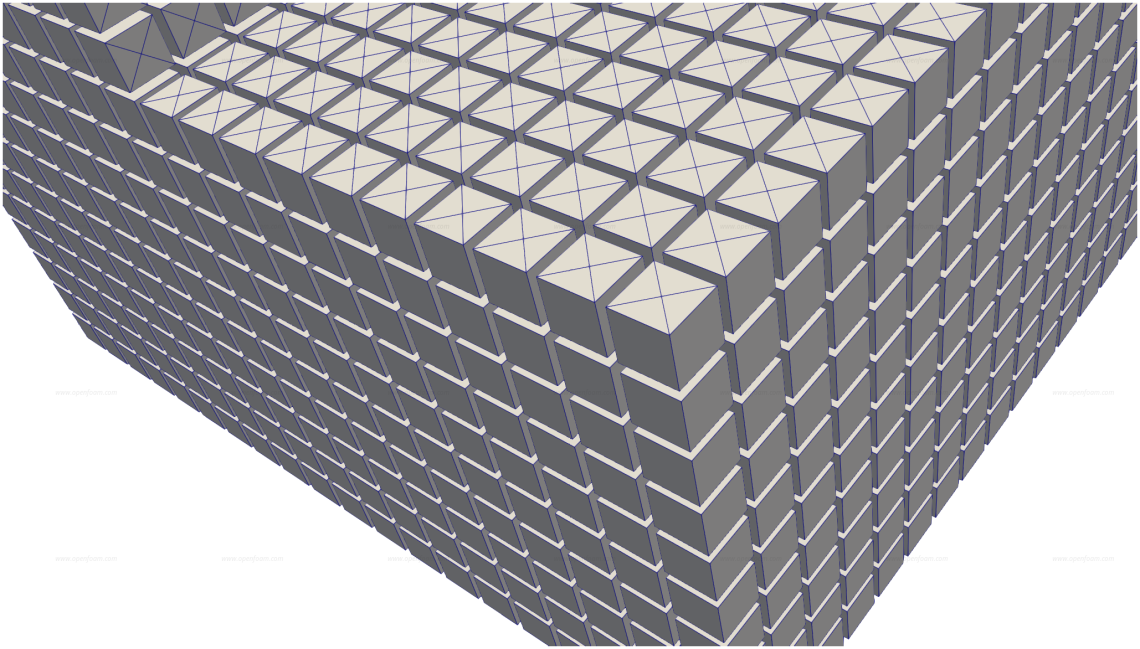
The cellDecomposer function object decomposes cells into basic shapes and maps selected fields onto them (similar to mapFields). In this release, the functionality has been extended to allow faces to be split without splitting the cells themselves. This can be very beneficial when interfacing with an externally defined triangle mesh using AMI, as it guarantees that the face uses exactly the same geometry as the triangle mesh.
A typical configuration to convert faces into face-centre triangles is shown below:
functions
{
    cellDecomposer
    {
        type            cellDecomposer;
        libs            (fieldFunctionObjects);
        fields          ();
        mapRegion       tetMesh;

        // How to decompose faces
        decomposeType   faceCentre;

        // Cell set to decompose
        selectionMode   cellSet;
        cellSet         dummy;  // empty set

        // Face set to decompose
        faceSelectionMode faceSet;
        faceSet         facesToDecompose;
    }
}
This reads in a cell set dummy and a face set facesToDecompose. Both can be generated using the topoSet application. In this particular case the cell set is empty and the face set contains all faces of a chosen patch:
{
    name    dummy;
    type    cellSet;
    action  clear;
}
{
    name    facesToDecompose;
    type    faceSet;
    action  patchToFace;
    patch   missingCorner;
}
The image below illustrates the effect on the missingCorner tutorial, where the quad faces of one patch have been converted into triangles.
Source code
Tutorial
Issue
TOP
VTK volume geometry output (e.g. from foamToVTK or the vtkWrite function object) no longer shows artefacts at processor boundaries. This clean-up was already in place for Ensight output, and the VTK volume infrastructure now includes an equivalent topological point merge to remove these processor boundary artefacts.
Both the Ensight and VTK conversions now also accept a -base-name option when used as utilities, or a baseName property when used as function objects. This allows an alternative base or stem name for output files that is independent of the case name.
The foamToEnsight and foamToVTK utilities now properly support absolute output paths. This is particularly useful when running with distributed roots, as it allows output to be directed to a common directory such as an NFS-mounted location.
TOP
The surface noise utility has been extended to process surface data that contains no geometric surface information. This is admittedly an unusual concept, but it addresses a genuine need: for externally sampled data, pressures are sometimes only available as values at face centres without any accompanying geometrical data. It is now possible to specify that the input data corresponds to zero-dimensional elements (a point element in Ensight terminology, or a vertex element in VTK terminology), and the surface noise processing will handle them accordingly.
The underlying changes to the surface readers and writers are not currently available to regular surface sampling, but could be considered for a future release if there is sufficient interest.
In addition, thanks to a contribution from Robert Perry, the Ensight collatedTime writing mode for surfaceNoise now correctly retains the writer between loops, ensuring proper collating behaviour.
TOP
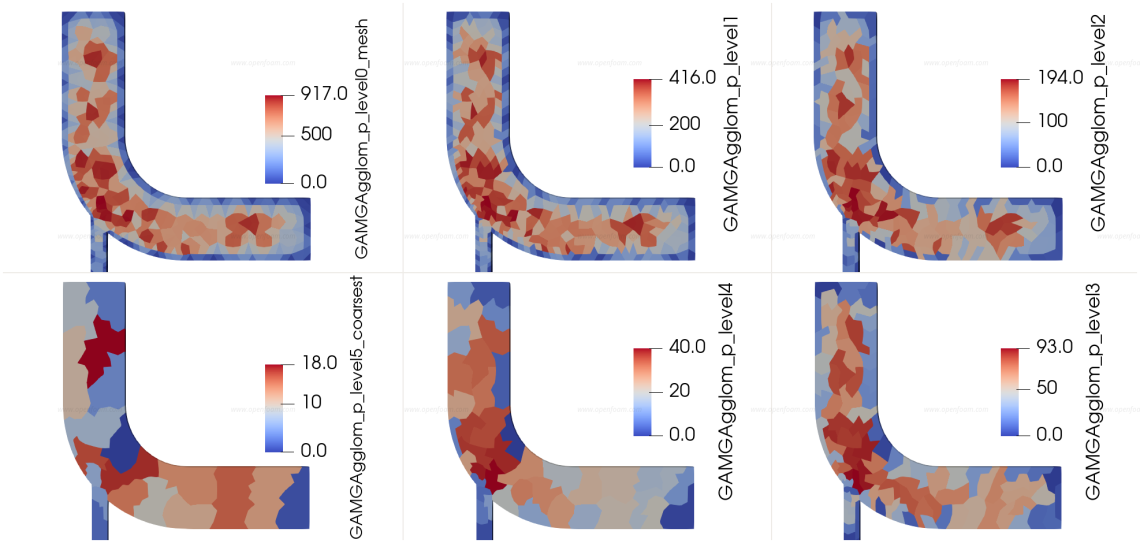
The quality of field agglomeration has a significant effect on GAMG solver performance. The solver is particularly effective at solving the pressure equation, which tends to dominate steady-state run times.
The new agglomerationInfo function object enables users to create volume fields where agglomeration regions are coloured, providing a straightforward means to visualise the agglomeration structure (commonly referred to as “blobs”).
The function object is typically specified as follows:
agglom1
{
    type            agglomerationInfo;
    libs            (utilityFunctionObjects);
    writeControl    writeTime;
}
Example images are shown below:
The agglomeration table is also written to file.
Source code